

A Melbourne distributor running 4 warehouses, 2,000-plus SKUs, and a purchasing team still reconciling stock in a shared Excel spreadsheet every Monday morning.
They had MYOB for invoicing, a separate freight portal, and a whiteboard in the dispatch bay for backorders. Sound familiar?
When they came to Envertis, their biggest fear wasn’t the software. It was switching — again.
They’d tried an ERP before. It failed. The consultant disappeared. The data was a mess. That fear is real, and it’s the first thing we address.
This guide is written for people in exactly that situation: ready to fix the problem, but needing to trust the process first. Here’s what getting started with Odoo for distribution actually looks like — based on 18 real Australian onboardings.
Why Australian Wholesale Distributors Are Switching to Odoo
Invoicing is in MYOB. Inventory lives in Pronto or a spreadsheet. Purchase orders go out by email. Landed costs are calculated manually in Excel — sometimes after the goods have already shipped.
In our work with over 18 wholesale businesses across Australia, the trigger for switching isn’t always pain. Sometimes it’s ambition. But in 2024–25, the triggers multiplied.
Supply chains that were already fragile coming out of COVID haven’t fully stabilised. Lead times from Southeast Asian suppliers remain unpredictable. Freight costs — air and sea — are still volatile, which means landed cost accuracy isn’t a nice-to-have.
It’s the difference between a profitable order and one that quietly bleeds margin. Businesses running landed costs through Excel are finding out too late.
At the same time, Australian labour costs are climbing. The minimum wage has risen three years in a row.
Wholesale distribution is an admin-heavy operation — purchase orders, goods receipts, 3PL coordination, invoicing, reconciliation — and every one of those workflows either runs on people or runs on software.
That’s where the real case against MYOB and Pronto starts. It’s not that they’re bad tools. It’s that they were built for a world where a business could afford to operate in silos.
Today, a CFO asking for a real-time margin report shouldn’t have to wait three days. A national account shouldn’t be a risk — it should be an opportunity the system can handle.
A business wins a new national account and realises its current setup will crack under the volume. The cost of disconnection is real, consuming 15-20 hours of avoidable admin work per week: duplicate data entry, stock write-offs, slow purchasing cycles, and an inability to grow without hiring more admin staff.
Odoo ERP for wholesale distribution solves this by replacing the stack with one connected system — not by adding another tool to the pile.
What Makes Odoo Different for Distribution (vs. Generic ERP)
Most ERP systems were built for manufacturing or finance first. Distribution is an afterthought — handled by an add-on module or a third-party bolt-on that costs extra and breaks on updates.
Odoo was designed to be modular from the start. Inventory, Purchasing, Accounting, and Sales share a single data layer.
Unlike traditional ERP vendors, Odoo has no per-module licensing trap. You pay for users, not features. That significantly changes the economics for a 15-person distribution business without an IT department.
| Feature | Odoo | MYOB Advanced | Pronto Xi |
| Native multi-warehouse management | ✔ Included | ⚑ Add-on cost | ✔ Included |
| Reorder rules + automated POs | ✔ Native | ⚑ Limited | ✔ Native |
| Australian GST / BAS reporting | ✔ Localised | ✔ Localised | ⚑ Config required |
| Lot / serial number tracking | ✔ Included | ✘ Not standard | ⚑ Module cost |
| Open-source / no per-module licence | ✔ Yes | ✘ Per-module | ✘ Per-module |
**Feature assessment based on standard published tiers as of Q1 2025. Vendor packaging and inclusions change — always confirm current feature availability and pricing directly with the vendor before making a purchasing decision.
The 5-Stage Getting-Started Roadmap (Based on Real Envertis Onboardings)
This isn’t a generic project plan. Every stage below reflects how we’ve actually structured Odoo ERP implementation for distributors across Australia — from FMCG wholesalers in Brisbane to industrial parts distributors in Perth. Most go-lives complete within 10–12 weeks.
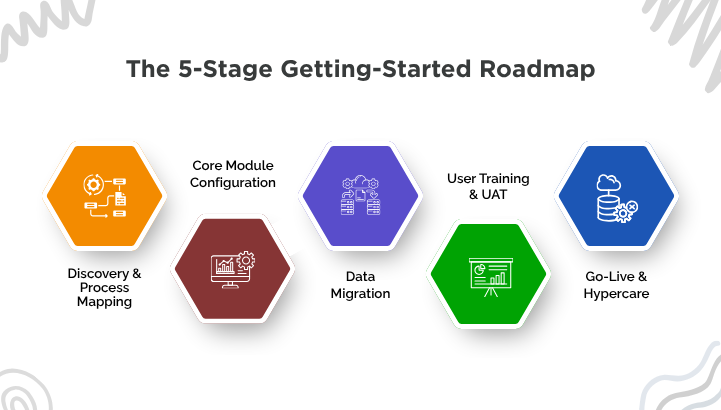
- Stage 1 · Weeks 1–2
Discovery & Process Mapping
Before a single line of Odoo is configured, we map your current workflow. Where do purchase orders originate? How is stock counted? Where do returns go? What does your warehouse floor actually look like?
What you need to prepare:
➝ Your current product/SKU list (even a rough CSV is fine)
➝ Supplier list with lead times if you have them
➝ A sketch or description of your warehouse layout (zones, aisles, cold storage)
➝ Your top 3 operational pain points — written down
Common mistake: Skipping discovery to “save time.” Every client who has rushed this stage has encountered scope creep by month two. The two weeks you spend here save four weeks later.
- Stage 2 · Weeks 3–5
Core Module Configuration
This is where Odoo is built for your business. Not a demo environment — your actual warehouses, your tax settings, your supplier pricelists.
Odoo Inventory: Warehouses, internal locations, putaway rules (e.g., refrigerated goods to Bay 3 automatically)
Odoo Purchase: Vendor price lists, reorder rules with minimum stock thresholds, supplier lead times feeding your replenishment schedule
Odoo Accounting: Australian chart of accounts, GST tax groups configured for 10% GST and GST-free lines, BAS-aligned reporting
- Stage 3 · Weeks 4–6
Data Migration
Data migration runs in parallel with configuration. The goal is clean opening data — not a perfect historical archive.
What to migrate:
➝ Product master data (SKUs, descriptions, units of measure, categories)
➝ Supplier and customer records
➝ Opening stock quantities by location
➝ Active purchase orders and open customer orders
➝ Lot/serial number records (if traceability is required)
What NOT to migrate: Historical transactions from more than 12 months ago. This is the single most common migration trap. Importing five years of invoices adds weeks of cleanup and delivers almost no operational value. Archive it separately and start clean.
- Stage 4 · Weeks 6–8
User Training & UAT
Training is role-based, not role-generic. Warehouse staff learn receiving, transfers, and stock adjustments. The purchasing team learns reorder rules, vendor PO workflows, and landed cost allocation. Finance learns reconciliation, BAS preparation, and reporting.
We use a train-the-trainer model: one or two of your people become internal Odoo champions. They handle day-to-day questions after go-live. This dramatically reduces your dependency on external support.
UAT scenarios to test for distribution:
➝ Receive a partial shipment against a PO
➝ Transfer stock between two warehouse locations
➝ Trigger a reorder rule and confirm the automated PO
➝ Process a customer return and update stock
➝ Generate a BAS-period tax report
- Stage 5 · Week 9+
Go-Live & Hypercare
Go-live day is deliberately quiet. By this stage, your team has used the system. The data is in. The workflows are tested. The first 30 days post-launch — what we call hypercare — is when our team is most active.
During hypercare, we monitor for early warning signs: unexpected stock movements, GST coding errors, and reorder rules firing at the wrong thresholds.
The primary KPI we track with every distribution client is stock accuracy rate — the percentage of physical stock that matches the system.


Australian-Specific Considerations You Can’t Ignore
Getting Odoo for Australian distributors right means more than installing the software. Australia has specific compliance requirements and logistics realities that a generic ERP implementation won’t account for.
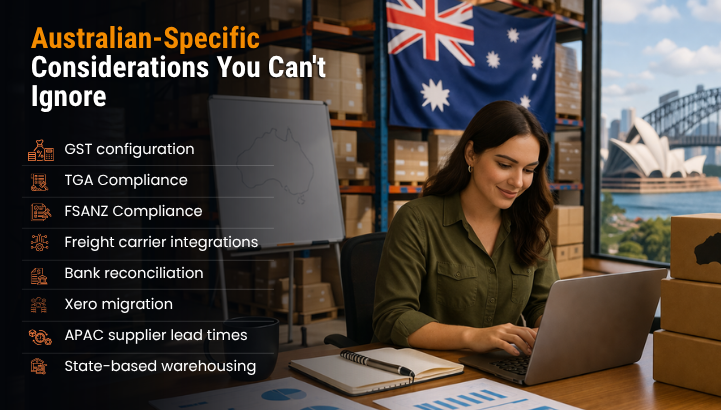
- GST configuration: Odoo’s tax engine supports multiple tax groups. For Australian distributors, this means correctly mapping 10% GST lines, GST-free items (such as fresh produce and exported goods), and input tax credits.

- TGA Compliance (medical devices and healthcare product distributors): Odoo lets you track lots and serial numbers, manage expiry dates, and comply with TGA recordkeeping rules. You get full traceability, from your supplier’s batch all the way to your customer. If you ever need to do a recall, you’re ready.
- FSANZ Compliance (food and beverage distributors): Inventory comes with lot tracking and built-in best-before or use-by date tools. Odoo supports country-of-origin labelling and helps you trace allergens. If there’s ever a recall, you have the audit trails to meet FSANZ Food Standards Code requirements.
- Freight carrier integrations: Odoo connects with StarTrack, Toll, and Couriers Please via connector apps, enabling real-time tracking updates inside delivery orders—no more logging into three portals.
- Bank reconciliation: Live bank feeds from ANZ, CBA, and Westpac connect directly to Odoo Accounting. Statements are imported daily and automatically matched against open invoices.
- Xero migration: Many of our clients run Xero for accounting pre-Odoo. The migration path is clean — we export your chart of accounts, outstanding invoices, and opening balances, then map them into Odoo Accounting. Most clients replace Xero entirely within 30 days of go-live.
- APAC supplier lead times: If you source from China, Vietnam, or India, 45–90 days is the norm. Odoo’s reorder rules account for this — you set the lead time per supplier, and the system calculates when to fire a replenishment PO based on current stock and projected demand.
- State-based warehousing: Running warehouses across NSW and QLD? Odoo handles inter-company and inter-warehouse stock transfers with full audit trails — relevant for businesses with separate ABNs or GST registrations per entity.
How Envertis Onboards Wholesale Distributors Differently
Most Odoo partners can install the software. Few understand the compliance requirements, carrier ecosystems, and supply chain realities of Odoo for distributors and wholesalers in Australia. This is the gap Envertis fills in.
Most ERP implementations fail for the same reason: a vague scope, a distant consultant, and a go-live date that slips by three months. We’ve structured our delivery to prevent exactly this.
Envertis uses a fixed-scope discovery model. Before any configuration begins, we document your workflows, agree on what’s in scope, and price accordingly. There are no surprise change requests for standard distribution functionality.
Every build starts with Australian compliance first: GST, BAS, freight integrations, and bank feeds are configured in Stage 2 — not bolted on as an afterthought before go-live. Our team is based in Australia. When something urgent comes up on a Tuesday morning, you’re not waiting for an offshore ticket queue to open.
One of our clients — a Melbourne-based FMCG distributor with three warehouses and 1,800 SKUs — reduced stock discrepancy errors by 80% within 60 days of go-live. Not because Odoo is magic, but because the process mapping in Stage 1 uncovered that their biggest accuracy problem was a manual stock transfer process between two locations. Odoo automated it. The fix was straightforward. The impact was immediate.
Getting Started: The Honest Summary
Odoo for distribution isn’t a silver bullet. It’s a well-engineered platform that works exceptionally well when implemented with the right process discipline — and falls short when rushed or under-scoped.
What we’ve seen across 18 Australian wholesale onboardings is consistent: businesses that invest properly in Stages 1 (discovery) and 4 (training) achieve the best outcomes. The ones that skip straight to configuration end up revisiting both within six months.
If you’re a wholesale distributor in Australia evaluating your next ERP move, start with a self-assessment. As a certified Odoo partner with a track record across Australian distribution businesses, Envertis offers a free 30-minute discovery session — no sales deck, no pressure, just an honest look at your situation.

Frequently Asked Questions
Q. How long does an Odoo implementation take for a wholesale distributor?
A. For most mid-sized Australian distributors — 10 to 80 staff, one to four warehouse locations — a standard Odoo implementation runs 10 to 12 weeks from kick-off to go-live. Complex setups involving multiple entities, 3PL integrations, or manufacturing components may extend to 16 weeks. The biggest variable is data quality and internal resource availability during UAT.
Q. Can Odoo replace MYOB or Xero for an Australian distribution business?
A. Yes — and for most distributors with 10+ staff and meaningful inventory, it’s the right move. Odoo Accounting handles GST, BAS reporting, bank reconciliation, and invoicing natively. The migration path from Xero or MYOB is well-established: we export your chart of accounts and opening balances, map them into Odoo, and run both systems in parallel for 2–4 weeks before switching over. Most clients fully replace MYOB or Xero within 30 days of go-live.
Q. Does Odoo handle lot tracking and expiry dates for food or pharmaceutical distributors?
A. Yes. Odoo Inventory includes native lot and serial number tracking, including expiry date management. You can configure FEFO (First Expiry, First Out) picking rules so the system automatically directs warehouse staff to pick the stock nearest to expiry first. This is particularly relevant for food, beverage, and healthcare distributors operating under TGA or FSANZ guidelines.
Q. What Australian freight carriers integrate with Odoo?
A. Odoo supports integrations with major Australian carriers, including StarTrack, Toll, Couriers Please, and Australia Post via certified connector apps. These integrations enable label generation, real-time tracking status updates inside Odoo delivery orders, and automated proof-of-delivery notifications. If you use a 3PL provider, Odoo also supports EDI-based integrations with them, depending on their capabilities.
Q. Is Odoo suitable for ERP for wholesale distribution companies across Australia with multiple state locations?
A. Absolutely. Odoo handles multi-warehouse, multi-location operations natively — including inter-warehouse transfers with full audit trails, separate location costing, and entity-level reporting. For businesses with separate ABNs or GST registrations for each state entity, Odoo’s multi-company functionality handles this cleanly, including inter-company transactions and consolidated reporting.
Q. What does an Odoo implementation cost for a wholesale or distribution business?
A. For most Australian distributors, a full implementation ranges from $25,000 to $80,000 AUD, depending on scope, data migration complexity, and custom development requirements. Odoo licensing is subscription-based and charged per user per month — considerably less than legacy platforms like SAP or MYOB Acuity. A scoping session is the only reliable way to get an accurate figure.
Q. What kind of ROI can I expect from Odoo?
A. Most businesses recover implementation costs within 12 to 18 months. The gains typically come from reduced manual data entry, faster order processing, tighter inventory control, and BAS preparation that takes hours instead of days. Distributors managing multiple warehouses or facing long supplier lead times tend to see returns more quickly.
