
7.30 am. Monday morning. A switchboard factory in Western Sydney.
The floor is idle. A 40-unit order is due in Melbourne by Thursday.
No one can confirm whether the steel panels, mounting kits, and cable trays are all available.
Three spreadsheets. Two supplier calls. Multiple hours lost.
It is nearly 10 am. The delivery window is already at risk. Not a single unit has been built.
The cause is essentially the same: the lack of a single system that connects the Bill of Materials, inventory, and production orders.
Sounds familiar?
Managing Bill of Materials (BoM), tracking component availability, and coordinating multi-level production orders can quickly become overwhelming, especially as your product catalogue and supply chain grow.
That is precisely where the Bill of Materials (BoM) in Odoo Manufacturing comes in.
As one of the most flexible and powerful ERP solutions for manufacturers in Australia, Odoo offers a robust Manufacturing module that streamlines operations.
This blog presents a step-by-step BOM management tutorial designed specifically for Australian manufacturers seeking to create Bill of Materials (BOMs) in Odoo Manufacturing.
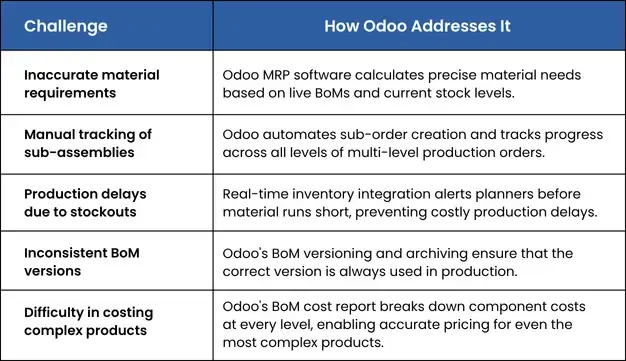
Common Challenges and How Odoo ERP for Manufacturing and Inventory Management Solves Them
Odoo Multi-level Manufacturing Process Guide: A Brief Understanding of Odoo BOM
One of the most powerful capabilities of Odoo MRP software is its support for multi-level BOM in Odoo. Also known as a nested or hierarchical Bill of Materials.
A multi-level BoM is used when a finished product contains sub-assemblies, each with its own BoM.
For example:
- Level 1 — Final Product: Electric Bike
- Level 2 — Sub-assembly: Chassis, Battery Pack, Main Frame
- Level 3 — Components: Motor Unit, Coil, Magnets, Housing
In the Odoo multi-level manufacturing process, each sub-assembly can automatically trigger its own production order.
This makes Odoo BOM management far more efficient than managing spreadsheets or disconnected tools.
Types of Bill of Materials (BoM) in Odoo Manufacturing
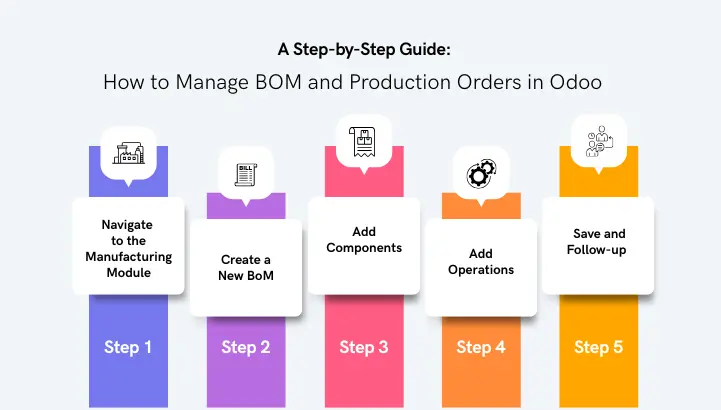
Before diving into the step-by-step Odoo BOM management tutorial, it is important to understand the different BoM types available in the Odoo manufacturing module:
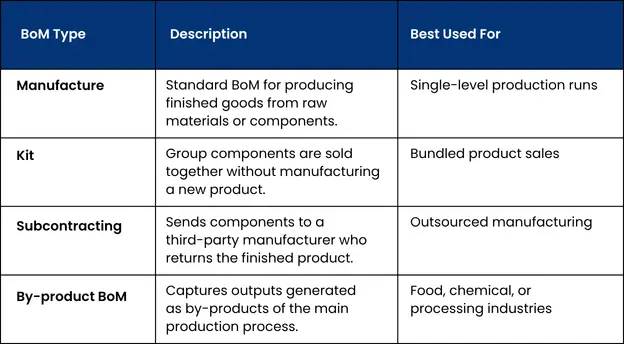
A Step-by-Step Guide: How to Manage BOM and Production Orders in Odoo
Here is a practical, step-by-step Odoo BOM management tutorial to help you get started:
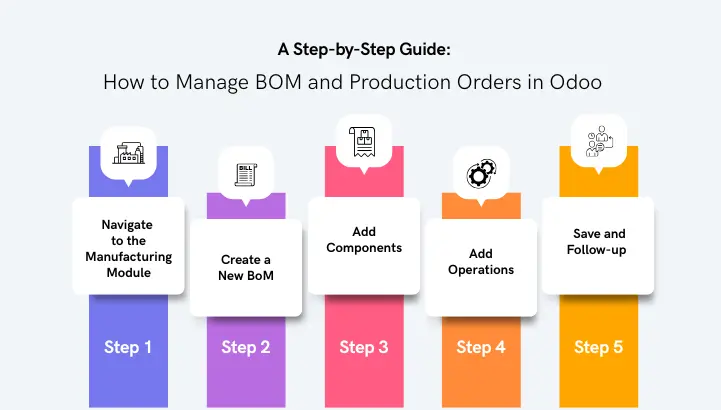
- Step 1
Navigate to the Manufacturing Module
Log in to your Odoo instance and go to Manufacturing > Configuration > Bill of Materials. This is the central hub for all your Odoo BoM management activities.
Without starting here, any BoM you create sits outside the manufacturing workflow and won’t connect to procurement, inventory, or production orders.
- Step 2
Create a New BoM
Click “New” and fill in the following fields:
- Product: The finished good you are manufacturing.
- BoM Type: Select Manufacture, Kit, or Subcontracting as appropriate.
- Quantity: The quantity this BoM produces (e.g., 1 unit).
- Company: Ensure the correct Australian entity is selected if you run a multi-company Odoo.
- Step 3
Add Components
In the Components tab, click Add a Line to add each raw material or sub-component. For each component, specify the product, quantity, and unit of measure.
This is at the heart of managing BoM in Odoo. If quantities or units are entered incorrectly, Odoo’s MRP engine will either over-order stock, tying up working capital, or under-order it, bringing your production line to a halt.
- Step 4
Add Operations
To add work centre procedures like cutting, assembly, or quality inspection, select the Operations tab. This enhances the Odoo manufacturing method and enhances the accuracy of ability planning and work order management.
It will be difficult to pinpoint which work centre is causing delays if this step is skipped, since Odoo will be unable to track how long each step takes.
- Step 5
Save and Follow-up
Once all components and operations are entered, click “Save”. Your BoM is now active and available for use in production orders. BoMs can always be edited, archived, or duplicated as your product line expands.
Any incomplete or draft-state data is carried over to active orders if a finalised BoM is not reviewed and saved before it enters production. This can result in exaggerated costs, missing components, and failed replenishment triggers at precisely the time you least afford them.
Once these are in place, when you confirm the main production order, Odoo automatically creates individual manufacturing orders for all sub-assemblies beneath it.
Each of those orders can be managed independently, scheduled separately, and tracked in real time through the Odoo manufacturing module. This gives your floor supervisors full visibility at every level without anyone having to create a single child order manually.
Key Features of the Odoo Manufacturing Module for Australian Manufacturing Businesses
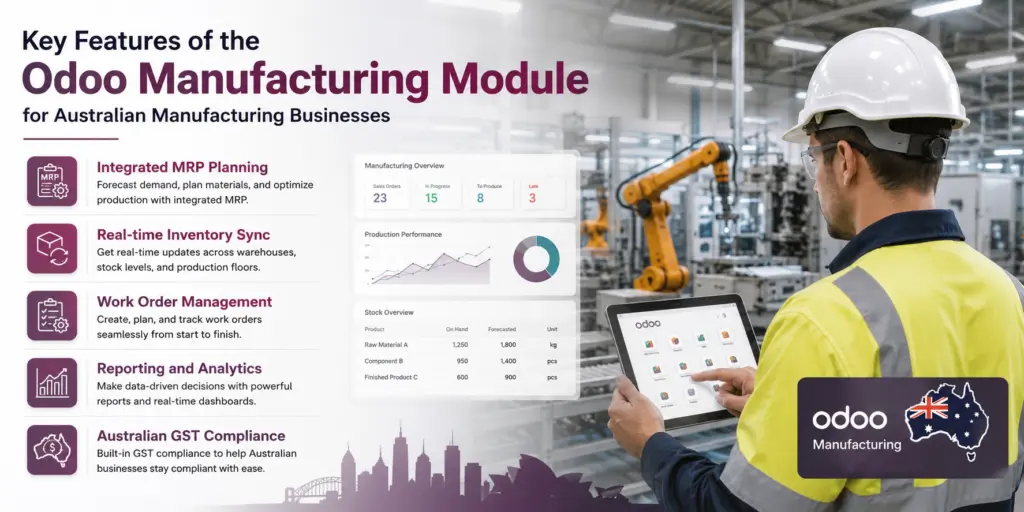
- Integrated MRP planning:
Odoo MRP software automatically calculates material requirements based on your BOMs, on-hand stock, and scheduled production orders.
For Australian manufacturers managing long lead times from offshore suppliers, this eliminates the manual planning errors that turn a two-week buffer into a production stoppage.
- Real-time inventory sync:
Every component consumed during production is immediately deducted from stock, keeping your manufacturing and inventory management perfectly aligned.
This is especially valuable for Australian businesses operating across multiple warehouses or sites, where stock discrepancies between locations are a common and costly problem.
- Work order management:
Manage work orders by work centre, track employee time, and monitor machine usage across all production levels.
With Australian labour costs among the highest in the Asia-Pacific region, accurate time tracking at each work centre helps you identify inefficiencies before they erode your margins.
- Reporting and analytics:
Generate detailed BoM cost analyses, production efficiency reports, and material availability forecasts directly within Odoo.
When raw material prices are volatile, and freight costs from Asian suppliers remain unpredictable, having live cost visibility at the BoM level allows Australian manufacturers to reprice quickly and protect margins.
- Australian GST and compliance:
Odoo supports Australian tax configurations, including GST, making it straightforward to integrate your manufacturing operations directly with your finance module.
This removes the need for manual reconciliation between your production and accounting systems, reducing end-of-quarter workload and the risk of reporting errors to the ATO.
For Australian manufacturers whose production schedules are tightly linked to customer delivery deadlines, this feature is invaluable in Odoo production order management.

Why Manufacturers Should Opt for Odoo ERP for Manufacturing and Inventory Management?
Australian manufacturing is diverse, from boutique food and beverage producers in Victoria to large-scale mining equipment fabricators in Western Australia.
Finding ERP software for manufacturers in Australia that scales with your business, integrates seamlessly with local regulations, and does not break the budget is a real challenge.
Here is why manufacturers should opt:
- The ability to expand and contract according to the requirements of your company.
- Responsive open source with assistance at the enterprise level.
- A comprehensive Enterprise Resource Planning (ERP) system that integrates buying, production, inventory control, product sales, and financial statements.
- A strong partner network throughout Australia with certified Odoo consultants. It is a cost-effective solution when compared to traditional ERP systems.
Whether you are looking for the best Odoo MRP solution for Australian manufacturers in the food, pharmaceutical, metal fabrication, or electronics landscape.
The Odoo manufacturing module provides the tools you need to manage your Bill of Materials and production orders with confidence.
Ready to Implement ERP Software for Manufacturers in Australia?
Managing your Bill of Materials (BOMs) in Odoo Manufacturing is straightforward if you have configured them correctly and understand the manufacturing workflow. You’ll be able to move your production planning from “fly by the seat of your pants” to a smooth, data-driven operation. Work with a certified Odoo partner to tailor the platform to your specific production needs and industry requirements.
As an Australian manufacturer, you have access to a powerful MRP that supports multi-level BOMs and integrates with ERP for both manufacturing and inventory management. Odoo offers many benefits, including easy-to-use interfaces at various levels of complexity. Several key guides provide an excellent starting point for both new and experienced users looking to further improve their ERP workflows and BOMs.

Frequently Asked Questions (FAQ)
- Why does the Bill of Materials (BoM) in Odoo matter for manufacturers?
The Bill of Materials (BoM) in Odoo manufacturing includes a detailed list of all Items and their quantities, along with all operations necessary to create a finished item from start to finish. The Bill of Materials forms the basis of the complete Odoo Manufacturing Module.
If you don’t have an accurate Bill of Materials, your material requirements planning, production scheduling & inventory management will also be inaccurate. For Australian Manufacturers, developing accurate Odoo BOM management from the beginning is essential to both operational efficiency and cost control.
- What is the difference between a single-level and multi-level production order in Odoo?
A single-level production order in Odoo is used when all components in your BOM are raw materials or purchased items. There are no subassemblies to manufacture, but multi-level production orders are useful for complex products with multiple assembly stages.
This gives manufacturers a single system to plan, schedule, and track every sub-assembly, from raw Material to finished goods, without switching between tools or manually reconciling data.
- Can Odoo MRP software handle by-products and scrap in manufacturing?
Yes. Odoo MRP software fully supports by-products and scrap tracking within the BoM. You can define by-products directly on the BoM, for example, in food processing, where peeling generates waste with a secondary use. Odoo will automatically account for this in your inventory and production records.
- Is Odoo manufacturing suitable for small and medium-sized Australian manufacturers?
Definitely! Manufacturers throughout Australia rely on Odoo’s manufacturing software throughout their manufacturing process. Because of its modular framework, you only activate the functionality that you need, making it much easier to control costs.
Some examples of small- and medium-sized businesses that have implemented Odoo to manage their manufacturing and inventory processes include companies in the food, custom furniture, electronics, and light engineering industries, many of which had been using spreadsheets to manage these functions before adopting the software.
- How does Odoo handle BoM versioning and updates?
Version control is supported by Odoo’s Bill of Materials (BOM) Management through archiving previous BOMs and creating new ones. Whenever there are revisions to product design or modifications to a manufacturing process, a new BOM is created.
Archiving a previous BOM causes all future production orders to be associated with the current BOM. In addition, all historical production orders will continue to reference the BOM as of their creation, ensuring complete traceability.
