
Picture this. Your finance team runs on Odoo 15.
Over the years, your developers built custom modules for batch pricing, freight rules and EDI exports. Those modules keep your warehouse moving.
Then Odoo 19 arrives, your support window narrows, and a security patch you need will not install. All at once, your switch is blocked by the modification that used to give you an upper hand.
This is the most common rationale Australian manufacturers and wholesalers give for delaying a shift. They fear their custom code will break.
This fear isn’t legitimate, though it’s easy to address. With the right development services and a disciplined plan, you can transfer unique integrations and modules to a new version without losing your software’s uniqueness.
This blog covers the technical aspects, the most common errors, and how experienced Odoo ERP consultants can reduce transition risk.
Why Upgrading Odoo Custom Modules Is Not Optional
Staying on an old version feels safe. It is not. Starting in April 2026, ERP will impose an additional 25 per cent charge on older versions of its Enterprise software, specifically on the Odoo platform and on-site installations. Newer versions of this program continue to receive security updates and fixes.
This situation has real consequences for businesses, especially wholesalers and manufacturers. An unsupported ERP is a compliance and security exposure. It also blocks new features your competitors already use. Newer releases bring faster performance, better reporting, and native tools that often replace older customisations entirely.
Experienced Odoo ERP consultants treat upgrades as projects, not patches. That mindset separates a smooth cutover from a week of firefighting.
How an Odoo Version Upgrade Actually Works
An ERP upgrade runs on two separate tracks. Confusing them causes most of the pain. The first track is the database migration. Odoo’s official upgrade platform at upgrade.odoo.com converts your standard data and database schema to the new version. It handles the tables, fields and records that ship with the standard ERP. For Community users, the community-driven OpenUpgrade project fills a similar role.
The second track is custom code migration. This is your responsibility, or your partner’s. The upgrade platform does not rewrite your modules. It only accounts for the data they created. Your Python logic, views, reports, and ERP integration services all need a manual review against the new version because the platform cannot guess your business logic.

Worried a Custom Module Will Break Your Upgrade?
Have our Odoo ERP consultants audit your version, custom modules and integrations, then map the compatibility risks before you migrate.
Get a Free ERP Upgrade AssessmentStep-by-step Odoo Custom Module Migration: Upgrading Custom Modules to a Newer Version
A disciplined upgrade of custom Odoo modules to a newer version turns a risky upgrade into a controlled project. Follow a repeatable sequence. Do not improvise on a live database.
Before migrating, make sure you’ve covered these essential steps first:
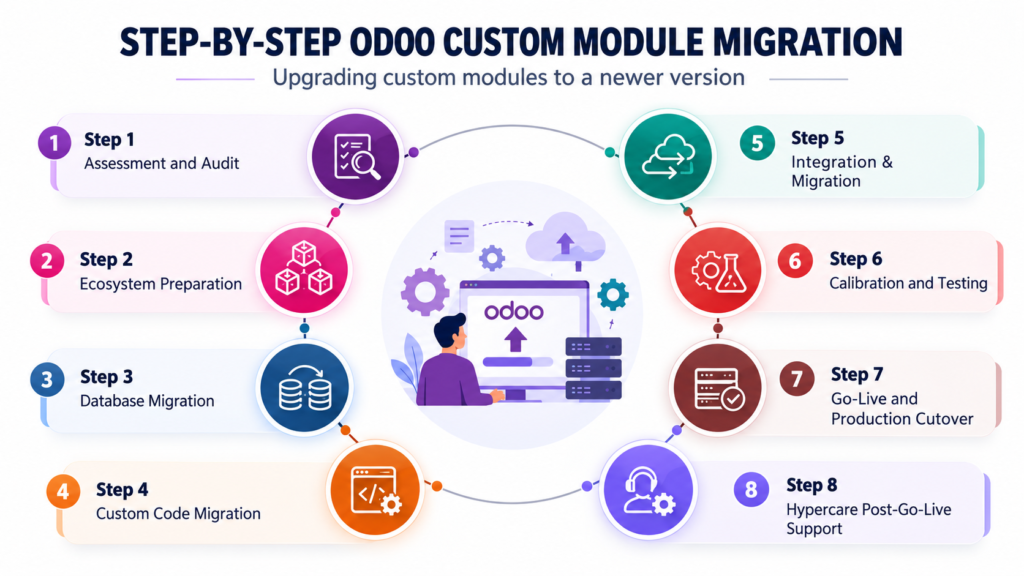
Step 1: Assessment and Audit
Every upgrade starts with a full picture of what you run.
- Inventory every custom module, third-party app, and integration, with its version and author.
- Flag modules that are dead, duplicated, or now replaced by standard Odoo.
- Produce a compatibility report that sets the scope and the timeline.
Step 2: Ecosystem Preparation
Developers never work on production. They build a safe workspace first.
- Clone production into an isolated staging environment, such as an Odoo.sh staging branch.
- Place all custom modules under version control in Git and tag the current version.
- Stand up a clean instance of the target version for the migrated code.
Step 3: Database Migration
This phase moves your standard data to the new version.
- Submit a database copy to Odoo’s upgrade platform, or use OpenUpgrade for Community.
- Review the upgraded database for missing records, broken fields, and log warnings.
- Confirm the standard data is clean before any custom code runs.
Step 4: Custom Code Migration
This is the core technical work, and where most of the effort goes.
- Refactor each module for the new API, fixing deprecated ORM methods and renamed models.
- Rebuild views and reports, replacing deprecated syntax such as attrs and states.
- Reinstall and upgrade every module to the target version until it loads without errors.
Step 5: Integration & Migration
External systems need the same care as your internal code.
- Reconnect payment gateways, EDI feeds, freight APIs, and accounting syncs.
- Run an Odoo API compatibility check on every webhook, endpoint, and data format.
- Confirm each integration sends and receives data correctly on the new version.
Step 6: Calibration and Testing
Do not go live until formal testing concludes.
- Run automated unit tests, then functional tests, then user acceptance testing with real staff.
- Reconcile stock levels, ledgers, and open orders between the old and new systems.
- Sign off only when the numbers match and users approve.
Step 7: Go-Live and Production Cutover
Plan the cutover to the hour.
- Freeze the scope and pick a low-volume window.
- Run the final production upgrade and deploy the migrated code.
During the migration, keep the existing system accessible as a spare system.
Step 8: Hypercare Post-Go-Live Support
At go-live, the project is not concluded.
- Monitor the new system closely and resolve any issues quickly.
- Tune performance and hand over updated documentation.
- Move into ongoing Odoo support services once the system is stable.
Common ERP Upgrade/Data Migration Challenges
Old versions do not just age quietly. They add cost, security exposure, and operational risk with every month you wait. The good news is that you can avoid most upgrade challenges. By running regular audits, setting up staging environments, following strict procedures for ERP custom code migration, and drafting solid cutover plans, you can avoid surprises.
Most ERP upgrade challenges are predictable. Knowing them early saves days of rework.
- Deprecated APIs. Methods and decorators change between versions. Code that ran cleanly on Odoo 15 may throw errors on Odoo 19.
- View and XML changes. Attributes, widgets, and inheritance rules evolve. Broken views often surface only when a user opens one specific screen.
- Third-party module gaps. An OCA module or a paid app may not yet support your target version. You may need to wait for a release, fork the code, or replace the module.
- Integration drift. External systems expect a certain data shape. Odoo integration migration must confirm that webhooks, APIs and endpoints still match after the move.
- Undocumented customisations. The riskiest changes are the ones nobody wrote down. A thorough Odoo module compatibility review exposes them before they cause an outage.
Now you don’t have to choose between keeping your business updated and maintaining customisation. With the right Odoo service providers, you keep both. Good habits separate a clean upgrade from a costly one.
These ERP migration best practices come from real projects, not theory. Keep customisations lean. The more standard your configuration, the cheaper future upgrades become.
What are the Benefits of a Strategic Upgrade/Migration
The catch is your custom modules. Standard data migrates predictably. Custom code does not. This is why so many businesses stall, and why skilled Odoo development services matter.
Speed without a plan is expensive. A well-planned migration helps you:
- Zero in on the backlogs of out-of-date methods and quick patches.
- Use Odoo’s standard features instead of complicated custom code.
- Work better and provide precise estimates when the data is clear.
- Connect smoothly with the modern tools and platforms you already use.
Upgrades fail for the same reasons full implementations do. Teams underestimate custom code, skip proper testing, and discover broken integrations on go-live day.
Why Choose Envertis for Odoo Migration Best Practices
Envertis offers a Free Odoo Upgrade Assessment. In a short-term appointment, our Odoo ERP consultants assess your current version, custom modules, and interfaces, then develop a standardised, low-risk migration protocol. Most clients leave with a clear list of compatibility issues. Where a native feature now covers a custom need, retire the custom code and use the standard tool. Version control everything. Store your custom modules in Git. To ensure a smooth recovery if needed, define both the release you migrated from and the release you upgraded to. Freeze the scope during the upgrade. Do not add new features mid-migration. Ship the upgrade first, then enhance. Mixing the two is how budgets blow out.
Plan the cutover carefully. Select a low-volume time span, prepare everyone well in advance, and keep the existing system as a backup to keep the switchover short. Envertis, an Australian Odoo Gold Partner, has completed more than 80+ ERP implementations and has worked with Odoo since 2017. As one of the region’s more established Odoo consulting companies, the team pairs Odoo customisation services with structured Odoo support services, so your upgrade keeps performing long after go-live.
Ready to Move to a Newer, Supported Version?
Book a free consultation with Envertis and get a clear, low-risk upgrade path built around your custom modules and integrations.
Book A Free Odoo ConsultationFrequently Asked Questions
Q. How long does it take to upgrade custom Odoo modules to a newer version?
A clean setup with a few customisations can take two to four weeks. A heavily customised system with many integrations can take two to three months. A proper audit gives you an accurate timeline before any work begins.
Q. Can I skip versions, for example from Odoo 15 to Odoo 19?
Yes. Odoo’s upgrade platform handles multi-version jumps in a single pass for standard data. Your Odoo custom module migration still needs a review for every version in between because deprecations and code changes stack up across releases.
Q. Will my third-party and OCA modules work after the upgrade?
Not automatically. Each module needs an Odoo module compatibility check against the target version. Some have ready-made releases. Others need your development services team to port them.
Q. How do I protect my integrations during a migration?
Test every connection in staging first. An ERP API compatibility review confirms that external systems still send and receive data correctly before you go live. This is a core part of any safe ERP integration migration.
Q. Is Community or Enterprise easier to upgrade?
Enterprise includes Odoo’s official upgrade service. Community relies on OpenUpgrade and stronger in-house or partner skills. Both are achievable with the right Odoo implementation services.
Q. What causes most ERP upgrade challenges?
Custom code and undocumented changes. Standard data rarely breaks on its own. This is why experienced Odoo service providers focus first on your customisations and integrations.
Q. How much downtime does an Odoo upgrade cause?
A practical concern for wholesalers and manufacturers who cannot stop operating, tied to the staging and cutover points mentioned earlier. Most activities are performed only in the staging environment, so they don’t interfere with your operational equipment. Your downtime is limited to the cutover period itself, which is only a few hours during a low-activity window. A tested rehearsal keeps that window short and predictable.
Q. What happens if something breaks after we go live on the new version?
A properly executed upgrade keeps your existing system available as a fallback option. Well-organised post-implementation support, known as hypercare, provides quick solutions as issues arise. This is a core part of dependable Odoo support services.
