
It is Friday afternoon. Your sales manager needs a quote approved before the customer signs. But the approval is stuck in someone’s inbox. The stock count lives in a spreadsheet that is two days old. By Monday, the customer has gone elsewhere.
Sound familiar?
This happens when your ERP does not match how your business works. Staff devise solutions with emails and spreadsheets, while the system you put in place fails to deliver on its commitments. Your ERP can’t handle your workflows, forcing your team to rely on emails and spreadsheets; as a result, your facilities hold you back instead of helping.
This blog presents a clear, step-by-step Odoo customisation plan to help you decide.
What Are the Steps, and How Does Odoo Customisation Actually Work?
Before starting the Odoo customisation process, it’s important to understand the difference between setup and customisation. Workflows, email templates, user rights and permissions, and other fundamental Odoo features are called configuration. Odoo customisation, by contrast, is a much more involved process.
It means modifying the source code to add certain fields and views and include other features that the standard version of the product does not have. As an open-source system, Odoo custom development lets software developers build almost any type of service on the platform. This creates room for creativity but requires a solid implementation plan.
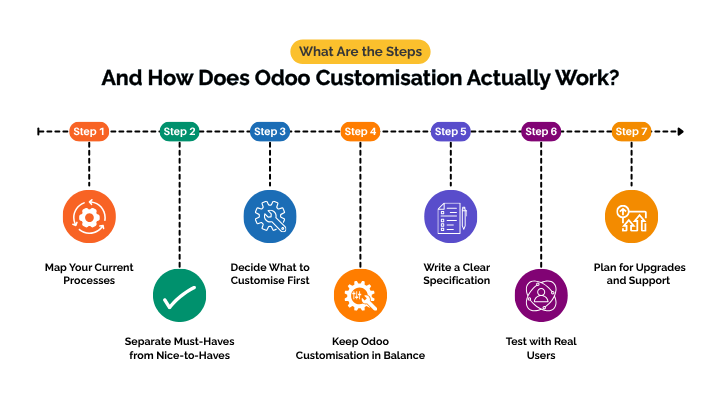
Step 1: Map Your Current Processes
Start with what your team does every day. Walk through each key process, such as quote to invoice or order to delivery. Write down every step.
Note each time someone leaves the system. Maybe they copy data into a spreadsheet or chase an approval by email. These gaps show where Odoo customisation will help most.
Step 2: Separate Must-Haves from Nice-to-Haves
Not every idea needs new code. Sort each request into one of three groups:
• Settings: Odoo can already do it with the right setup.
• Ready-made apps: an app from the Odoo Apps store can solve it.
• Custom work: it truly needs Odoo custom development.
This simple filter keeps your budget on track. It also lowers your risk. Unplanned extra work is a common cause.

Need Odoo to Fit the Way You Work?
Talk to our team about Odoo customisation that Australian businesses can rely on. We will map your needs first, then show you what to change and what to leave alone.
Book a Free Consultation Today.Step 3: Decide What to Customise First
You get the best return by starting with a few high-impact areas. Common starting points include:
• Cleaner screens: hide fields and menus your staff never use.
• Smarter workflows: add approval steps, automatic alerts or stages for your industry.
• Branded documents: make quotes, invoices and reports look like your business.
• Mobile views: let field and sales teams work from a phone or tablet.
• Links to other tools: connect payment, online store, shipping or payroll systems so data flows on its own.
• Better data: stop duplicate records and add checks that keep details correct.
Automation is a big part of this. Automation means the system does a repetitive task for you. For example, Odoo can email a reminder when an invoice is overdue.
Step 4: Keep Odoo Customisation in Balance
Changing an ERP is common. The same Panorama report found that 37% of organisations customised between 26% and 50% of their ERP. But more is not always better. Significant modifications to Odoo’s core code can slow upgrades and increase costs.
Building each new feature as a standalone system is a useful tip. This keeps standard Odoo clean. It also makes moving to a new Odoo version much easier. Good Odoo ERP custom development follows this rule from day one.
Step 5: Write a Clear Specification
Put your list in writing before any coding starts.
For each feature, describe:
1. The problem you want to fix
2. The result you expect
3. Who will use it
4. How you will know it works
Add simple examples, like a sample report or a rough sketch of a screen. A clear brief means fewer surprises and a more accurate quote.
Step 6: Test with Real Users
Developers can check that code runs. Only your staff can check that it works for the business.
Set up a test copy of your system. Ask the people who will use each feature to try it with real tasks. Fix any issues and test again before go-live. This step builds trust and makes the change much smoother.
Step 7: Plan for Upgrades and Support
Your company will experience ongoing transformations, and therefore your system needs to change too. Use version control to store your code and be sure to document any custom modules you can get.
Review your changes and decide whether they’re still beneficial at least once a year. Get rid of them if they’re not. You can also prepare your Odoo software customisation for the upcoming release by running routine tests.
Why Choosing the Right Partner Matters for Businesses
The above-mentioned steps work best with an experienced team guiding you. Look for a partner who asks about your processes before suggesting code, favours modular development, and offers post-go-live support.
The steps work best with an experienced team by your side. A good Odoo customisation company will:
• Ask about your processes before suggesting code
• Build changes as separate modules
• Show you similar projects in your industry
• Explain how they handle version upgrades
• Offer support after go-live
Ask to see examples of similar projects in your industry, and check how they handle version upgrades.
Not sure which changes you really need?
Our Odoo experts will review your processes first. Then we will show you what to change and what to keep standard.
Talk to an Odoo Expert.Get Odoo Customisation With Envertis That Fits Your Business Process
Effective Odoo customisation begins with your people and protocols, not an algorithm. Build modules, prioritise your needs, map your workflows, and test with real users. Then your ERP keeps pace as you grow.
Envertis has been an Odoo partner since 2017 and has completed more than 80+ Odoo implementations. We are a certified top Odoo partner with offices in Sydney, Melbourne, Brisbane, Adelaide and Perth. Our Odoo customisation services are built around how you work today. Our Odoo customisation solutions are designed to grow with you.
Envertis Software Solutions, as an Odoo partner, has a proven history of helping businesses get Odoo customised according to their needs, starting from our partnership in 2017. Our team has completed more than 75 model implementations. As a trusted top Odoo partner in Australia, with offices in Sydney, Melbourne, Brisbane, Adelaide, and Perth, we design Odoo customisation to fit your needs and grow with your business.
Frequently asked questions
1. What does Odoo customisation actually mean?
Customising Odoo means adapting the software to fit your company’s activities. In simple terms, Odoo customisation solutions can include adding a field to a sales form, but they may also involve creating new workflows, reports, or modules. The bottom line is that Odoo customisation should meet your company’s needs, not the other way around.
2. How do I know if my business needs customisation or just configuration?
Configuration uses the settings already built into Odoo, such as turning on features or setting up approval steps. Customisation goes further and involves changing code or building new functions. Start with configuration first. If the standard options still leave gaps in a key process, that is usually the sign you need customisation.
3. Will customising Odoo cause problems when I upgrade to a new version?
It can, if the changes are poorly built. Customisations that alter Odoo’s core code often break during upgrades. Changes built as separate modules, following Odoo’s development standards, carry over much more easily. Ask your partner how they plan for upgrades before any work begins.
4. How long does an Odoo customisation project take?
The extent and scope of the adjustments determine how long they will take. Simple modifications, like changing custom fields or layouts, usually take a few days, while more complex ones, such as connecting unique modules with other systems, might take weeks or months. Setting realistic timelines helps when you first define clear goals.
5. Can Odoo be customised to connect with other business software?
Indeed. Odoo can connect with eCommerce platforms, payment service providers, distributors, banks, and many other platforms. Some connections come through ready-made applications, while others require custom API development.
6. Should I customise Odoo myself or work with an Odoo partner?
Simple changes, such as adjusting views using Odoo Studio, are manageable for confident in-house users. For complex projects, you’ll want experts who understand the procedures involved in Odoo customisation services. You may learn what needs to change, what should remain the same, and how to make sure that Odoo continues to function properly as your business expands with a certified Odoo partner like Envertis.
