
In a competitive, rapidly changing business environment, organisations need technology that adapts as their operations evolve. An ERP system can provide a central platform for managing essential business functions, but standard features may not always align perfectly with every organisation’s processes. This is where Odoo ERP software customisation can make a meaningful difference.
Odoo provides an extensive range of business applications, including sales, CRM, accounting, inventory, manufacturing, and more. However, every organisation has its own workflows, customer expectations, operational requirements, and growth objectives.
Customising Odoo lets businesses adapt the platform to their requirements instead of forcing teams to work around a standard setup.
Why Should You Customise Odoo ERP?
No two businesses operate in the same way. Different industries have different processes, approval structures, customer journeys, reporting requirements, and operational challenges. While ready-made ERP modules can address many common business needs, some organisations require additional functionality to support their specific workflows.
With Odoo ERP software customisation, businesses can modify existing functionality, introduce new features, extend workflows, and develop custom modules. This can help create a more relevant ERP environment while supporting operational efficiency and business growth.

Not Sure If Your Business Needs Odoo Customisation?
Every business has unique processes, and your ERP should support them, not slow them down. Talk to the Envertis team about your workflows.
Book a Free Consultation TodayKey Advantages of Customising Odoo ERP
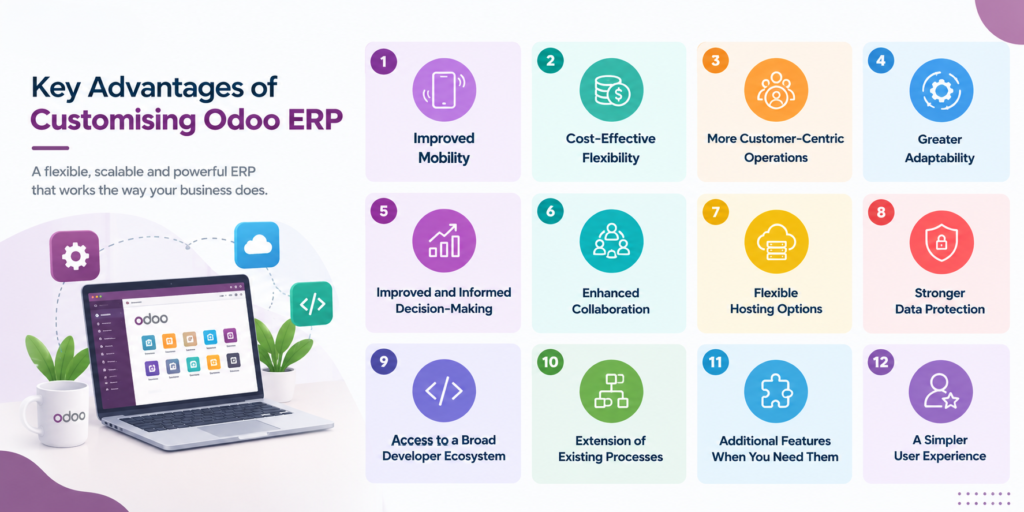
- Improved Mobility
Modern businesses increasingly require employees to access information and complete tasks while away from their desks.
Customising Odoo for mobile-friendly workflows helps employees access relevant information and complete essential activities while working remotely, travelling, or operating in the field. This can give teams greater flexibility when they depend on timely access to business data.
- Cost-Effective Flexibility
Custom software development can raise cost concerns. However, Odoo provides a flexible foundation that allows businesses to build on existing functionality rather than developing an entire ERP platform from scratch.
By customising relevant modules and extending existing features, organisations can focus their investment on functionality that addresses genuine business requirements. This can make Odoo ERP software a practical option for businesses seeking greater flexibility without replacing their entire technology environment.
- More Customer-Centric Operations
Customer expectations can vary significantly between businesses, industries, and markets. Customising Odoo lets organisations adapt customer-facing processes to these specific requirements.
Custom modules and tailored workflows can help teams manage customer requests, services, communications, and internal processes more effectively. For businesses operating across different regions, workflows can also be adapted to accommodate location-specific requirements and customer expectations.
- Greater Adaptability
Business requirements rarely remain static. As an organisation expands, its processes, teams, products, and operational requirements can change.
Odoo customisation provides the flexibility to extend the platform as these requirements develop. Businesses can add new functionality, modify existing workflows, and connect additional processes without moving to an entirely different ERP system.
- Improved and Informed Decision-Making
Reliable information is essential for effective business decisions. Customised reports and dashboards can help organisations focus on the information most relevant to their operations.
By tailoring reporting capabilities to specific business requirements, management teams can gain clearer visibility into areas such as financial performance, sales activity, inventory, and other operational metrics. This can support more informed decision-making.
- Enhanced Collaboration
An ERP system can provide a central environment where employees access shared business information and manage interconnected processes. Customisation can further improve collaboration by adapting workflows to the way teams communicate and work together.
By reducing unnecessary steps and connecting related activities, customised Odoo workflows can help employees access relevant information more efficiently and coordinate tasks across departments.
- Flexible Hosting Options
Odoo supports different deployment approaches, allowing businesses to select an environment that suits their operational requirements. Depending on their needs, organisations can consider cloud-based or on-premises deployment options.
This flexibility lets businesses choose an approach that aligns with their infrastructure, access needs, control requirements, and operational preferences.
- Stronger Data Protection
Business systems manage important operational and financial information, so security is a key consideration when implementing an ERP platform.
Odoo provides security capabilities designed to help organisations manage access to business information. Customisation can further support controlled workflows by tailoring user permissions and processes according to organisational requirements.
- Access to a Broad Developer Ecosystem
Odoo’s extensive developer ecosystem gives businesses access to technical expertise to extend and customise the platform.
A strong development community also makes it easier to find solutions, troubleshoot issues, and develop functionality that meets specific business requirements. This can help organisations maximise the value of their Odoo investment.
- Extension of Existing Processes
Businesses often need to extend their existing workflows as they grow. Instead of replacing an ERP process, organisations can customise Odoo to add steps, functionality, or automation.
Process extensions can help connect activities across departments while keeping workflows within a central ERP environment. This can improve operational consistency and productivity.
- Additional Features When You Need Them
Business requirements can change over time. A process that works effectively today may require additional functionality as transaction volumes increase or operations become more complex.
Odoo customisation lets businesses add features as needed. The goal should be to simplify processes and improve efficiency, not add unnecessary complexity.
- A Simpler User Experience
Employees are more likely to use an ERP system effectively when its interface and workflows are easy to understand.
Customising Odoo can help organisations simplify screens, remove unnecessary steps, and present relevant information where users need it. A cleaner interface can make everyday tasks easier to manage while reducing employee friction.
An ERP platform needs to remain relevant as business requirements evolve. Customisation helps organisations adapt their Odoo environment instead of letting the system become outdated as workflows change.
By extending functionality as new requirements emerge, businesses can keep using their ERP platform as operations evolve.
Key Considerations for a Successful Odoo Customisation Project
Customisation delivers significant value when planned around clear business requirements. Before starting an Odoo customisation project, organisations should consider several important factors.
- Define Clear Business Requirements
Start by identifying the processes that need improvement or automation. Document the challenges, desired outcomes, users involved, and required functionality.
A well-defined requirements list gives the development team a clear foundation for modifying existing modules or developing new functionality.
- Understand Your Industry and Business Requirements
Every industry has its own operational characteristics. Before customising Odoo, businesses should evaluate whether standard Odoo functionality and available applications can address their requirements.
When existing functionality doesn’t fully meet a specific industry or business need, targeted customisation may provide the required solution.
- Establish a Realistic Budget and Resource Plan
Customisation requires investment in development, testing, implementation, maintenance, and ongoing support. Businesses should set a realistic budget and determine the required resources before development begins.
A clear understanding of project scope, available resources, and expected outcomes can help organisations make more informed decisions about the level of customisation required.
The key is to customise with a clear purpose. Businesses should focus on solving genuine operational challenges, simplifying workflows, and creating functionality that delivers measurable value.
Transform Your Odoo ERP Around Your Business With Envertis
Customisation can help businesses turn an ERP platform into a system that reflects their actual processes rather than forcing employees to adapt to unnecessary limitations. From extending workflows and adding features to improving user experiences and reporting, tailored Odoo solutions can support operational efficiency and long-term growth.
At Envertis, we understand that every business has different requirements. With extensive experience in Odoo development and customisation, the team can help businesses enhance existing applications, add new functionality, extend workflows, and develop tailored components to meet their operational needs.
If your current ERP setup creates unnecessary work or limits your processes, exploring a customised Odoo ERP solution can help you build a more flexible, business-focused platform.
Ready to Build an Odoo ERP That Works the Way You Do?
Your ERP should support your team, not slow it down. Envertis can review your current Odoo setup, find the gaps in your workflows and build custom features that fit how your business actually runs.
Talk to an Odoo ExpertFrequently Asked Questions
1. What is a custom Odoo ERP solution?
A custom Odoo ERP solution is the standard Odoo platform shaped around your business. Developers adjust modules, workflows, reports and integrations so the system matches how your team actually works. Instead of changing your processes to suit the software, the software adapts to your processes.
2. Why choose custom Odoo over an off-the-shelf ERP?
Off-the-shelf ERP systems often force you into fixed workflows that do not fit every business. Custom Odoo keeps the strong core features but adds the tools your industry needs. This means fewer workarounds, less manual data entry and a system your staff are more likely to use every day.
3. Is a custom Odoo ERP suitable for small and medium businesses?
Yes. Odoo is modular, so you can start with only the apps you need, such as sales, inventory or accounting. As your business grows, you can add more modules and custom features. This makes it a practical, scalable choice for SMEs that want room to expand without replacing their system later.
4. How much does a custom Odoo ERP solution cost?
The cost depends on the number of users, the modules you need, the level of customisation and any third-party integrations. A simple setup costs far less than a complex, multi-site rollout. A certified Odoo partner can scope your requirements and give you a clear, fixed estimate before work begins.
5. How long does it take to implement a custom Odoo ERP?
Most implementations take anywhere from a few weeks to several months. A small business using core modules may go live quickly. Larger projects with data migration, custom development and staff training take longer. A phased rollout often works best, as it reduces risk and keeps daily operations running smoothly.
6. Can a custom Odoo ERP integrate with my existing business systems?
Yes. Odoo can connect with eCommerce platforms, payment gateways, CRM tools, payroll software and shipping providers. Custom integrations make sure data flows automatically between systems, so you avoid double entry and errors. Your partner should test each integration carefully to confirm records stay accurate across every platform.
