
Picture a Monday morning at a Sydney distribution business.
A sales order arrives above the customer credit limit, but nobody notices until the goods have shipped. A supplier price rise never reaches the purchasing team.
A high-value quote sits in a rep inbox for nine days with no follow-up. Each gap leaks margin, and each one traces back to a manual step someone forgot.
This is the exact problem that well-planned Odoo implementation services are built to remove. The opportunity is massive.
Odoo automated actions give wholesalers a practical way to capture that value inside one system, without heavy custom code.
What Odoo Automated Actions Actually Do
ERP handles automation through the base_automation module. After you enable developer mode, you will find those tools at Settings > Technical > Automation. In practical terms, it continuously tracks a model, detects when a trigger condition is met, and then runs one or more Odoo server-side computations.
A server action is the unit of work. An automation rule is the trigger that decides when the server action fires. Understanding that split is the key to reliable Odoo workflow automation. The rule answers “when”, and the server action answers “what happens”.
The Three Building Blocks of Automated Workflows in an ERP
Every rule you build rests on three parts.
1. The Model
The model is the record type the rule applies to, such as Sales Order (sale.order), Contact (res.partner), Invoice (account.move), or CRM Lead (crm.lead). The model sets the field library you can reference in every step that follows.
2. The Trigger
The trigger determines exactly when a rule runs. Odoo automation rules support several trigger types:
- On Creation: fires when a record is first saved.
- On Update: fires when chosen fields change, which you control through trigger fields.
- On Creation and Update: combines both events.
- On Deletion: fires when a record is removed.
- Based on Form Modification: reacts in the user interface before the record is saved.
- On Timed Condition: fires after a set delay based on a date field, for example, three days after the order date. This type relies on the background scheduled action to run.
- On Webhook: fires when an external system calls a generated URL, which suits Odoo integration services that connect ERP to other platforms.
3. The Server Action
The server action is the outcome. Common Odoo server actions include Update Record, Create a New Record, Send Email, Send SMS, Add Followers, Create Activity, and Execute Python Code.
You can group several server actions so a single trigger runs them in sequence.
The Step-by-step Process for Creating Automated Actions and Workflows in Odoo 19
The build itself is fast once the outcome is clear. You won’t need a developer to design the first few rules because the ERP keeps them all in one place. Shortly before opening the form, confirm what you want the rule to do. This makes each field’s choice clear and simple.
The sequence below takes a single rule from a blank form to a live trigger.
Follow this sequence for your first rule:
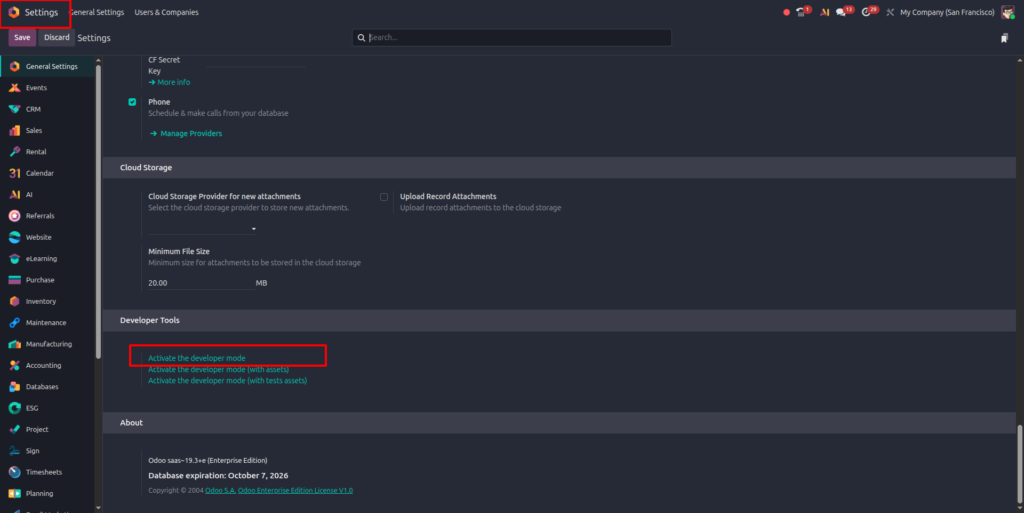
1. Turn on developer mode under Settings > General Settings.
2. Open Settings > Technical > Automation Rules, then click New.
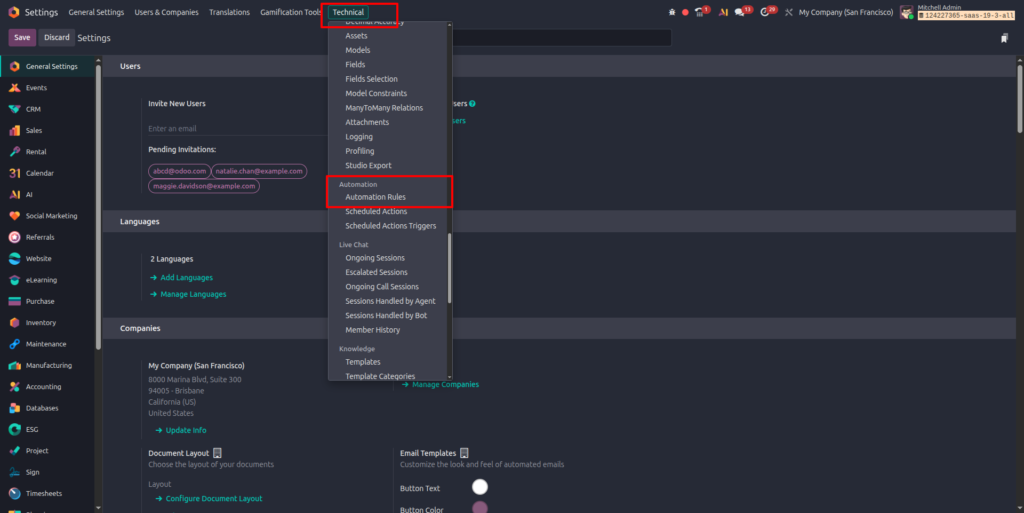
3. Name the rule and select the model, for example, Sales Order.
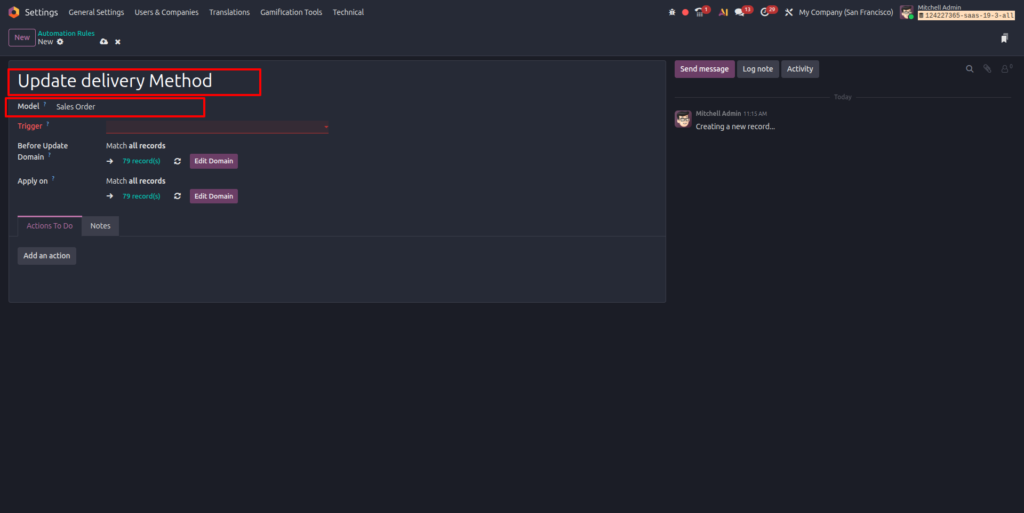
4. Choose the trigger, such as On Creation and Update, then pick the trigger fields that matter.
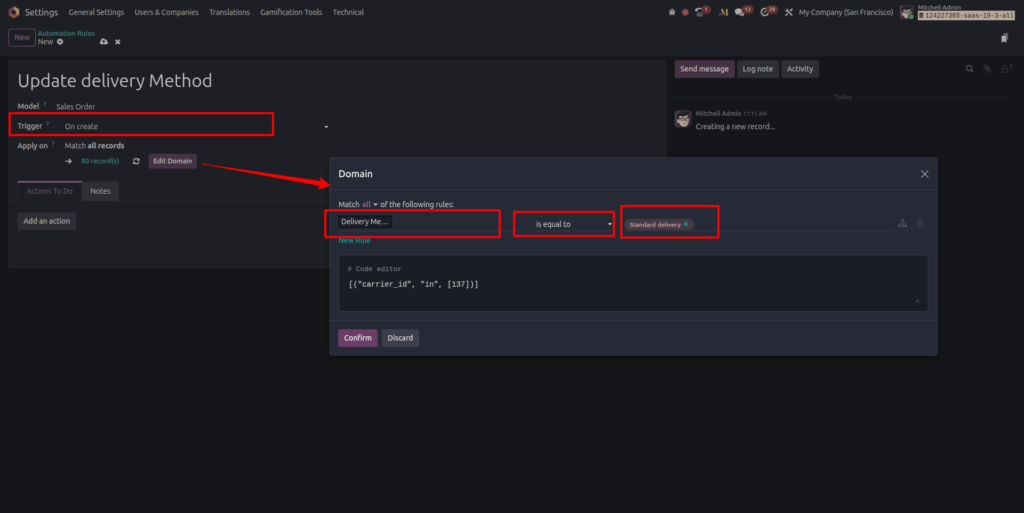
5. Set a filter domain to scope the rule. For example, [(‘amount_total’, ‘>’, 10000)] runs the rule only on large orders.
6. Add one or more server actions in the Actions To Do area.
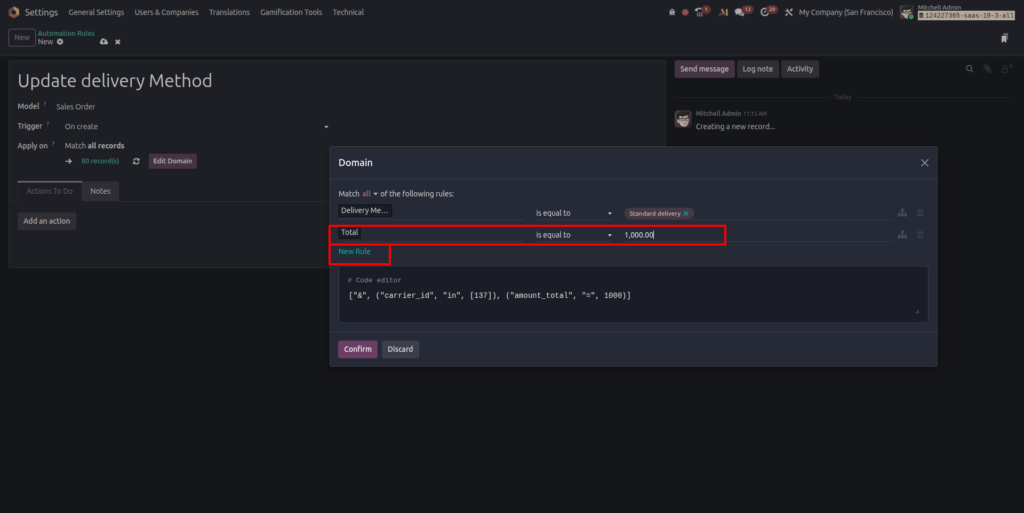
7. Save, then test with a sample record before you rely on it in production.
Most individuals move quickly through the testing process, which helps keep you safe. Run a sample record through the rule, verify the server action triggers, then confirm it stays silent when you remove that specific situation.
You could apply the same pattern for the next stage after a single rule exhibits specific traits. Small, tried-and-tested rules add up to a stable layer of Odoo workflow automation for every single business.

Practical Odoo Automated Workflows for Distributors
Now the payoff. These workflows protect margin in a real wholesale operation.
- Credit limit hold:
Trigger on sales order creation, filter for orders that push a customer over their credit limit, then run a server action that flags the order and creates an activity for the finance team. This single rule closes a common revenue leak.
- Low stock reorder alert:
Trigger on product update, filter where quantity on hand drops below a reorder point, then email purchasing. Distributors lose sales to stockouts, and Odoo consulting companies remove the guesswork.
- Stale quotation follow-up:
Use a timed condition three days after the quotation date, then create a follow-up activity for the sales rep. Faster follow-up lifts win rates. Because these actions write back to the contact and lead records, they also keep your Customer Management Software data clean and current.
Common Odoo Automation Mistakes to Avoid
Building a rule is the easy part.
Keeping a growing number of Odoo automation rules calm and predictable can be challenging. The bright side is that nearly every failure follows a common pattern, so you can anticipate the first automation failure instead of fixing problems later.
Only a few common blunders cause most automation troubles.
Watch for these:
- Looping rules:
A rule that updates its own trigger field keeps re-firing. Do not write back to a trigger field.
- Over-broad domains:
A loose filter runs on records it should skip. Scope every domain tightly.
- Sleeping timed conditions:
Time-based rules do nothing when the scheduled action is switched off. Evaluate the credentials of the background job.
- Too many rules at once:
Before adding the fourth rule, identify and develop the next one.
- Vague names:
A rule called “Action 1” tells nobody what it does. Name each rule clearly.
- Skipping the test:
Run a real record through first, then check the rule stays quiet when it should.
Get these basics right, and your Odoo development services help you stay predictable. As the chain grows, expert Odoo customisation services keep your ERP rules fast and clean.
Treat this list as a review step before every rule goes live. You can avoid hours of chasing a rule that mediated when it should have stayed silent with a five-minute check against these generic strategies. Because it stops minor mistakes from spreading through your larger Odoo automation, the experience matters more than any single replacement.
Simple rules are safe to build in-house. Complex chains that touch inventory, accounting, and manufacturing at once need a steadier hand. This is where a seasoned certified partner earns its keep. A certified partner maps your process first, then builds automation that matches how your business actually runs.
How Envertis Can Help as The Best Odoo ERP Consultants
Automation in Odoo isn’t a single feature. It is a discipline of triggers, domains, and Odoo server actions working together. Well-designed Odoo workflows combine conflicting manual systems into a highly credible chain. Envertis offers standard Odoo support services and workflows, giving you a structured way to close those gaps, from a single email alert to a full multi-step chain. The tools are ready inside the platform you already run.
Designing them with your company’s past initiatives in mind adds value. Envertis also supports manufacturers, distributors, wholesalers, and exporters across Australia. We are an Odoo Gold Partner. After completing Odoo customisation services, the team integrates safe Odoo process automation with proficient Odoo support services long after go-live.

Frequently Asked Questions
Q. What is the difference between automated actions and server actions in Odoo?
A server action defines what happens, such as sending an email or updating a field. An automated action, now called an automation rule, defines when that server action runs. You almost always use them together when you build automated workflows in Odoo.
Q. Do I need developer mode to create Odoo automation rules?
Yes. Odoo automation rules and server action menus sit under Settings > Technical, which appears only after you enable developer mode.
Q. Can Odoo automation run on a schedule instead of on a record change?
Yes. The timed condition trigger fires a set number of minutes, hours, or days before or after a date field. It depends on the background scheduled action, so confirm that the job is active.
Q. Are Odoo automated workflows available in the Community edition?
The base_automation module powers Odoo automated workflows in both Community and Enterprise editions, although some connected apps you may want to trigger are Enterprise-only.
Q. How do I stop an Odoo automated action from firing in a loop?
Loops occur when a server action sets a field already included in the rule’s trigger fields, causing the rule to fire unexpectedly. Add a domain criterion that the record no longer meets after the action completes, keep trigger fields tight, and prevent writing back to a trigger field. A well-scoped filter domain is the simplest guard.
Q. Can one automation rule run several server actions in sequence?
Yes. Add a server action that runs child actions, then list each step inside it. A single trigger then executes the whole group in order, which is how most multi-step Odoo server actions are built.
Q. What is the difference between trigger fields and a filter domain?
Trigger fields decide which field change wakes the rule. The filter domain decides which records qualify once it wakes. You often use both together in Odoo automation rules; for example, wake on a status change, then act only on orders above a set value.
Q. How do I send an automated email from an Odoo workflow?
Use a Send Email server action linked to an email template. Set the template model to match the rule model, map the recipient field, then attach the action to your trigger. The email then sends every time the workflow conditions are met.
