
Blogs
See why businesses move beyond Xero to Odoo to manage stock, purchase orders, manufacturing costs, warehouses and accounting in one integrated ERP system today.
It is Friday afternoon. Your warehouse team just wrapped up a stock count. Once again, the numbers do not match what is showing in Xero.
Somebody pulls up a spreadsheet. Someone else logs into the inventory system. Meanwhile, finance has to wait for the overnight sync before they can finally close out the month.
If this scene sounds all too familiar, you are definitely not alone. More and more Australian manufacturers and wholesalers face the same question: do we keep adding apps around Xero, or move to one system like Odoo ERP that runs stock, purchasing, production, warehouses and accounting together?
This guide is here to walk you through the Odoo vs Xero decision, without any sugarcoating. You will see what Xero does well, where it runs out of steam, and what moving to Odoo actually looks like for an Australian business.
Let us be fair to Xero. It is hugely popular among Australian businesses, and honestly, it is easy to see why. Bank feeds are fast, sending invoices is straightforward, and both GST and BAS reporting run smoothly. Your accountant probably loves it.
Xero even lets you track inventory. You can add your products, track stock levels, and it will handle cost of goods sold as you buy and sell. For a shop with a handful of products selling from one location, that really covers the basics.
But here is where things get tricky. Xero is accounting software with inventory management added on, not an operations platform. That is not a flaw. It is simply what the product was built to do. The trouble starts when your business stops being a simple buy-and-sell operation.
Envertis Tip:
Before you blame your accounting software, list every task your team does outside Xero in a normal week. If that list includes stock counts, production costing or reorder planning, the problem is not Xero. It is the gaps around it.
Xero is refreshingly honest about this.
Its own guide says native inventory supports up to 4,000 tracked items and tracks stock in a single location. For multi-location stock, batch or serial numbers, manufacturing support or advanced reordering, Xero suggests connecting a third-party app (Xero).
Here is how those Xero inventory management limitations show up on the floor:
None of this matters much for a small retailer. But if you are searching for ERP software for manufacturing businesses, or you run a growing distribution operation, these gaps become daily friction. That is usually the moment people start looking for a Xero alternative for businesses like theirs.
The usual approach is just to keep adding more apps.
You start with an inventory app, then toss in a manufacturing tool, maybe a warehouse scanner, slap on a CRM, and top it off with a reporting layer. Each one tackles a real problem. But together they are a headache waiting to happen.
Take a typical customer order running through a Xero-based system. Here is what that mess really looks like:
That is five different systems, four handoffs. Any of them can fail quietly, and you often find out at stocktake.
This is why so many operations teams start searching for integrated accounting and inventory software, or a genuine all-in-one business management software platform, instead of one more connector.
Panorama Consulting's 2026 ERP Report found that more than a quarter of organisations went over budget, with additional technology needs named as the leading cause.
Every app you bolt on later is a cost you did not plan for. Map the whole system before you buy anything.
Xero is accounting-first. Odoo ERP software is a set of connected apps (Inventory, Purchase, Manufacturing, Sales, CRM and Accounting) that share one database. When you confirm a sale, it reserves stock, plans production, and prepares the journal entry. No sync sits in between.
Here is the Xero vs Odoo ERP picture side by side:
| Area | Xero Plus Add-ons | Odoo ERP |
|---|---|---|
| Stock control | Native tracked inventory, up to 4,000 items in one location | Native Inventory app with real-time stock across locations |
| Purchase orders | Native purchase orders; reorder planning needs an add-on | Native Purchase app with reordering rules, vendor price lists, and approvals |
| Bill of materials and manufacturing costing | Needs an MRP add-on | Native Manufacturing (MRP) with multi-level BOMs, work orders and cost roll-up |
| Multi-warehouse | Needs an add-on | Native multi-warehouse, routes and bin locations |
| Barcode and landed costs | Needs add-ons | Native Barcode app and landed cost allocation |
| Accounting and GST/BAS | Strong native accounting, GST and BAS | Native accounting with Australian localisation: GST, BAS, TPAR and Peppol e-invoicing |
| CRM and sales | Needs an add-on | Native CRM, quotations and sales orders |
| Number of subscriptions | Often 3 to 6 separate apps | One platform, one subscription |
| Data sync risk | A sync point between every pair of apps | One database, no sync between core apps |
| Reporting | Split across systems, often joined in Excel | Live reports across sales, stock, production and finance |
The table is not saying Xero is poor. It is saying Xero is one piece of a puzzle, while Odoo inventory management software and accounting are already joined at the source.

Counting more add-ons than you expected?
Book a short call with an Odoo expert.The same system looks different depending on where you sit. Here is what changes for the people who feel the pain most.
Manufacturers
This is why Odoo works as real manufacturing cost management software and a common Xero alternative for manufacturing businesses that have outgrown job costing in Excel.
Wholesale Distributors
For importers, this makes Odoo a strong ERP software for wholesale distribution choice, because it calculates margins on true landed cost.
Warehouse Managers
Because it lives inside the same platform as sales and finance, Odoo becomes your warehouse management software without another sync.
Finance Leaders
Envertis Tip:
Check payroll separately. Odoo's own documentation says its Australian payroll is still working towards STP Phase 2 and SuperStream compliance. Many businesses keep their current payroll tool and post pay runs into Odoo until that changes.
Run through this list with your operations and finance leads. Be honest.
If you ticked three or more, you have likely outgrown accounting software with inventory management bolted on. You need a system where operations and finance share the same data, and that is where the best ERP software for inventory management earns its keep.
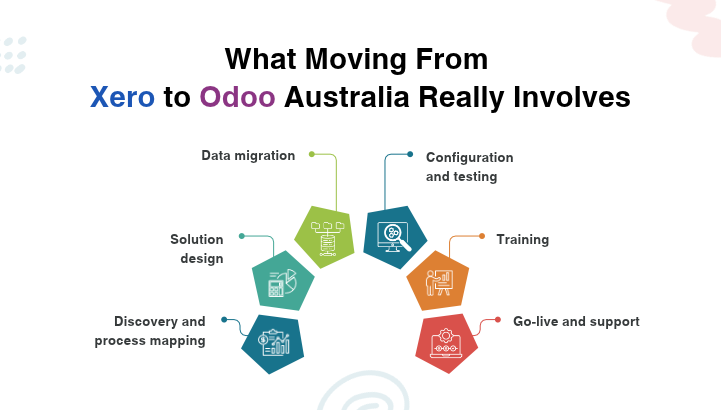
Let us be clear: this is not plug and play.
A good Odoo Australia project is planned in stages, and an experienced Odoo partner will usually guide you through them.
Envertis Tip:
Time your go-live for the start of a new month, ideally a new quarter. Your BAS period then sits cleanly in one system, and your accountant will thank you.
Xero is excellent at what it was built for. If you mostly buy and sell from one location, it may be all you need.
But once you manage stock across sites, purchase orders, production costs and warehouses, the Odoo vs Xero question changes. It is no longer about which accounting tool is better. It is about whether you want one connected system or a growing stack of apps that need constant care.
Odoo ERP is flexible, so how you set it up determines how well it works. Set up well, it fits your business. Set up badly, it rebuilds the same mess in one place. That is why the partner matters.
Envertis has been helping Australian businesses since 2005. We became an Odoo Partner in 2017, were named an Odoo Centre of Excellence in 2018, and have completed more than 80 Odoo implementations. With offices in Sydney, Melbourne, Brisbane, Adelaide and Perth, our team understands how Australian warehouse and finance teams really work.
Ready to see if Odoo fits your business?
Book a free Odoo consultation with Envertis.Yes, for most SMEs. Odoo ERP software includes full accounting with Australian GST and BAS, so you can retire Xero and the add-ons bought to cover Xero inventory management limitations. The result is integrated accounting and inventory software in one place. Check payroll separately, as Odoo's Australian payroll is still moving towards STP Phase 2.
Yes. The Australian localisation in Odoo ERP software includes preset GST taxes, a BAS report covering GST and PAYG withheld, TPAR reporting and Peppol e-invoicing. Your accountant can review BAS figures directly in Odoo, rather than reconciling data exported from several apps.
Yes. Contacts, products, the chart of accounts, opening balances and open invoices are commonly migrated. Most businesses keep older transaction history in Xero as a read-only archive. A clear Xero vs Odoo ERP data map, agreed early, keeps the migration clean and avoids surprises at go-live.
Often, yes. Odoo replaces several subscriptions with one, so compare it against your full app stack, not Xero alone. As ERP software for manufacturing businesses, it acts as your manufacturing cost management software, purchase order management software and ledger at once. Implementation is the higher cost, so ask for a scoped quote.
It depends on scope. A business moving Inventory, Purchase and Accounting will finish sooner than one adding multi-site manufacturing and warehouse management software as well. Anyone choosing Odoo as a Xero alternative for manufacturing businesses should allow extra time for BOM and routing set-up. Expect a phased plan with clear milestones after discovery.
For many Australian SMEs, yes. As ERP software for wholesale distribution, Odoo inventory management software combines multi-warehouse stock, reordering rules, landed costs and barcode scanning with accounting. It is a strong Xero alternative for businesses that want all-in-one business management software without the integration stack.
Get free consultation and let us know your project idea to turn it into an amazing digital product.

Se 506, 8 Help Street, Chatswood, NSW 2067
324 Queen Street, Brisbane, QLD 4000
171 Collins Street, Melbourne, VIC 3000
